

Albion Online cheats — Buy Albion Online
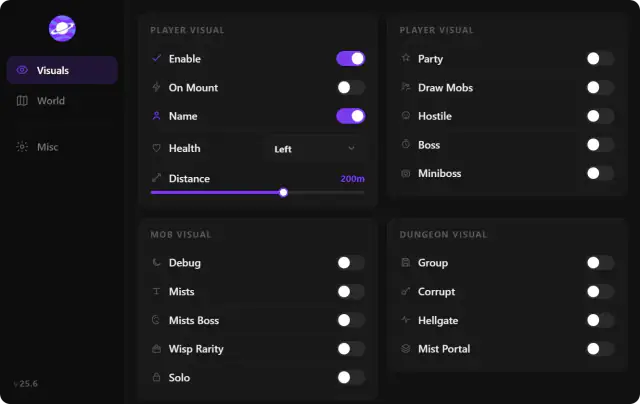
Enable player overlays, including on mount, name, health, distance, and party drawing.
At a glance
Albion Online cheat capabilities
What this package focuses on for Albion Online before you open the full module list.
Overview
Built around Albion Online visual overlays
How this Albion Online build fits competitive, matchmaking, and casual matches after major patches.
This listing is the Albion Online cheat on albioncheat.com—player, world, mob, and dungeon visual options as shown on the partner product page.
Review the option groups and screenshots here, confirm live status, then use Buy now for partner checkout. HWID Spoofer and Cloud DMA are separate products.
The Albion Online cheat listing on this site is the visual overlay product: player, world, mob, and dungeon options as shown on the partner page.
Use listed options only
Enable the groups you need, confirm live status, and remember that third-party overlays can violate game terms. No undetectable or ban-proof claims are made here.
Full listed visual suite
Player, world, mob, and dungeon visual options as published on the partner product page. Mob options include draw mobs, hostile, boss, miniboss, debug, mists, mists boss, and wisp rarity. Dungeon options include solo, group, corrupt, hellgate, and mist portal.
Availability
Check the status banner on albioncheat.com before purchase. Open a Discord ticket if you need current availability confirmed.
Modules
What's included in Player visuals for Albion Online
Every Albion Online module and overlay listed with Player visuals—toggle and tune in the operator portal.
- Player Visual Options: Enable
- Player Visual Options: On Mount
- Player Visual Options: Name
- Player Visual Options: Health
- Player Visual Options: Distance
- Player Visual Options: Party
- World Visual Options: Tier & Enchantment
- World Visual Options: Resources — Wood
- World Visual Options: Resources — Rock
- World Visual Options: Resources — Fiber
- World Visual Options: Resources — Ore
- World Visual Options: Resources — Hide
- World Visual Options: Resources — Misc
- World Visual Options: Chests
- World Visual Options: Hidden Chest
- World Visual Options: Avalon Drone
- World Visual Options: Lootbag
- World Visual Options: Player Lootbag
- World Visual Options: Mob Lootbag
- Mob Visual Options: Draw Mobs
- Mob Visual Options: Hostile
- Mob Visual Options: Boss
- Mob Visual Options: Miniboss
- Mob Visual Options: Debug
- Mob Visual Options: Mists
- Mob Visual Options: Mists Boss
- Mob Visual Options: Wisp Rarity
- Dungeon Visual Options: Solo
- Dungeon Visual Options: Group
- Dungeon Visual Options: Corrupt
- Dungeon Visual Options: Hellgate
- Dungeon Visual Options: Mist Portal
Experience
In the client · After you buy
Use the screenshots above for Player visuals—below is what each layer means and how access works after checkout.
In-game layers
- Layer A
World overlay
Nodes and camps labeled in the landscape.
- Layer B
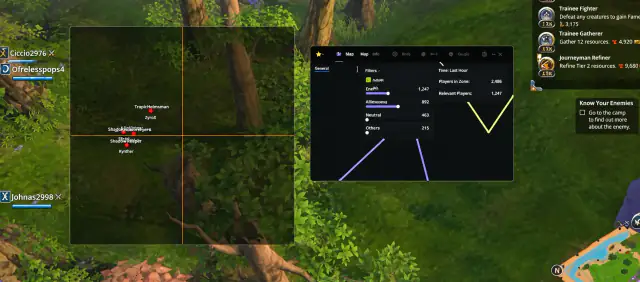
Player overlay
Nearby player names on the overworld map.
- Layer C
Player visuals
Enable, on mount, name, health, distance, and party.
- Layer D
Mob and dungeon
Draw mobs, bosses, hellgates, and mist portals.
- Layer E
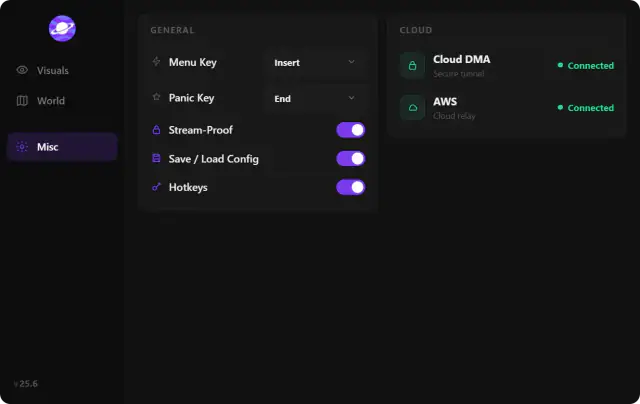
Utility menu
Cloud DMA listed as a separate product path.
Guides
Albion Online buy guides for Player visuals
Curated Albion Online articles for setup, tuning, and patch-day checks that match this product.
Listed Albion Online visual options: player, world, mob, and dungeon groups.
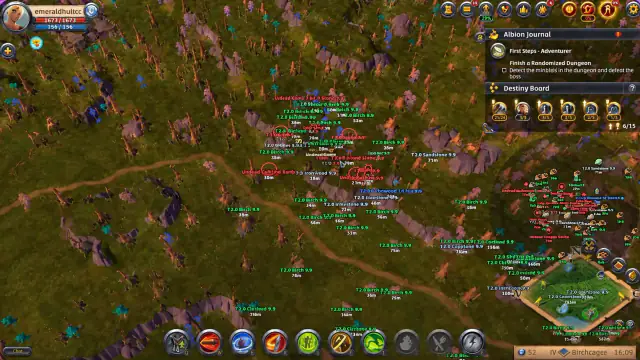
The main Albion Online cheat listing: visual option groups and partner checkout.
How player visuals work on this listing: enable, on mount, name, health, distance, and party toggles for nearby characters.
World visuals for resources, chests, Avalon drones, and lootbags in Albion Online, with tier and enchantment filters on the listing.
How player visuals differ from world, mob, and dungeon overlays on this listing, including the four option groups buyers compare before checkout.
Mob visual options: draw mobs, hostile, boss, miniboss, mists, and wisp rarity.
FAQ
Questions about this page
Answers tied to what you are reading—visit the FAQ page for every topic.